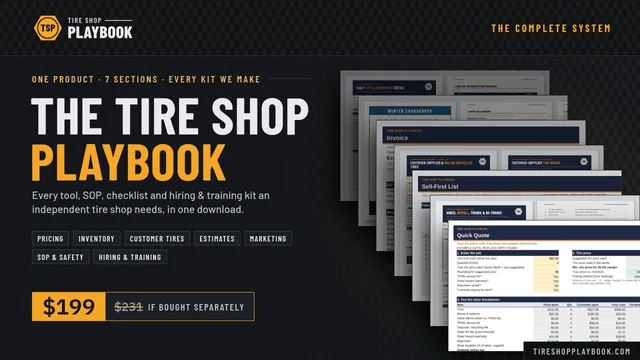
The complete system · 7 sections · 74 files

The Tire Shop Playbook

Every tool, SOP, checklist and hiring & training kit an independent tire shop needs, in one download. Pricing, inventory, customer-supplied tires, estimates, marketing, bay SOPs and safety, hiring and training: built the same way, so your whole crew can use it.

$199$231 Worth $231 if bought separatelyOne-time · Instant download · No subscription
  • Google Sheets + Excel
  • Word + PDF
  • Start Here guide + 30-day rollout
  • One-time price
The Tire Shop Playbook cover

Who it's for

For shops that run on memory and habit

Most independent tire shops run on prices set by feel, a rack nobody has dated, estimates on scrap paper, lift checks that happen when someone remembers, and new techs who learn by watching whoever's free. It works, until margin leaks, an old tire goes out the door, a wheel comes back loose, or a good tech walks.

The Playbook is for owners and managers of independent tire and auto shops, from one bay to several, who want written systems without hiring a consultant or paying for another monthly subscription. Built for the counter and the bay, not for spreadsheet experts.

What changes when you run it

  • Every quote makes money

    Out-the-door prices in seconds, real profit and margin on every job, and a margin check that flags what you're underpricing.

  • The rack sells oldest first

    Tire age read straight from the DOT code, a sell-first list, and the dollars tied up in aged stock.

  • The counter looks professional

    Signed 1-page estimates, a bay work order with torque and re-torque fields, and a clean invoice at pickup.

  • Customer-supplied tires, handled

    A clear accept-or-decline policy, an intake & waiver form, and install pricing that pays for the bay time.

  • Marketing all year

    A 12-month calendar built around the tire seasons, ready-made signs, posts and texts, and an ROI tracker.

  • One way to do the work

    A written bay SOP, daily lift and equipment checks, and a log of who's cleared for solo safety-critical work.

  • Hire carefully, train on purpose

    A pay range from public wage data, job ads, interviews and a skills test, then 10 training modules that end in sign-offs.

What's inside

Seven sections, one system

One download: a Start Here guide (PDF) and 7 section folders, one zip each. Every section has its own step-by-step Quick Start Guide and example data you replace with your own.

01 Pricing · 2 files · Google Sheets + Excel

Tire Pricing & Margin Calculator

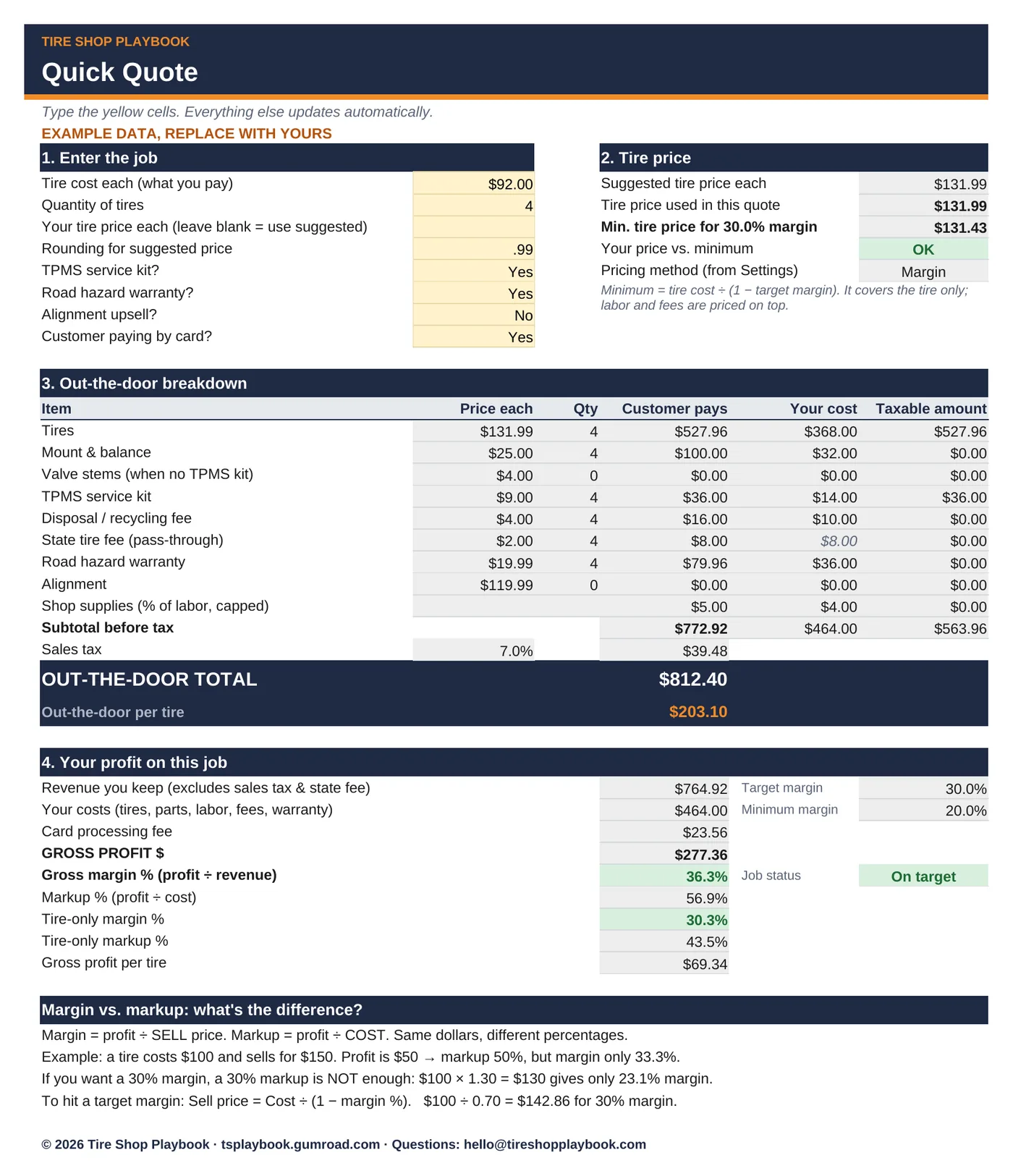
Quote out-the-door tire prices in seconds and see your real profit before you hand the customer a number.

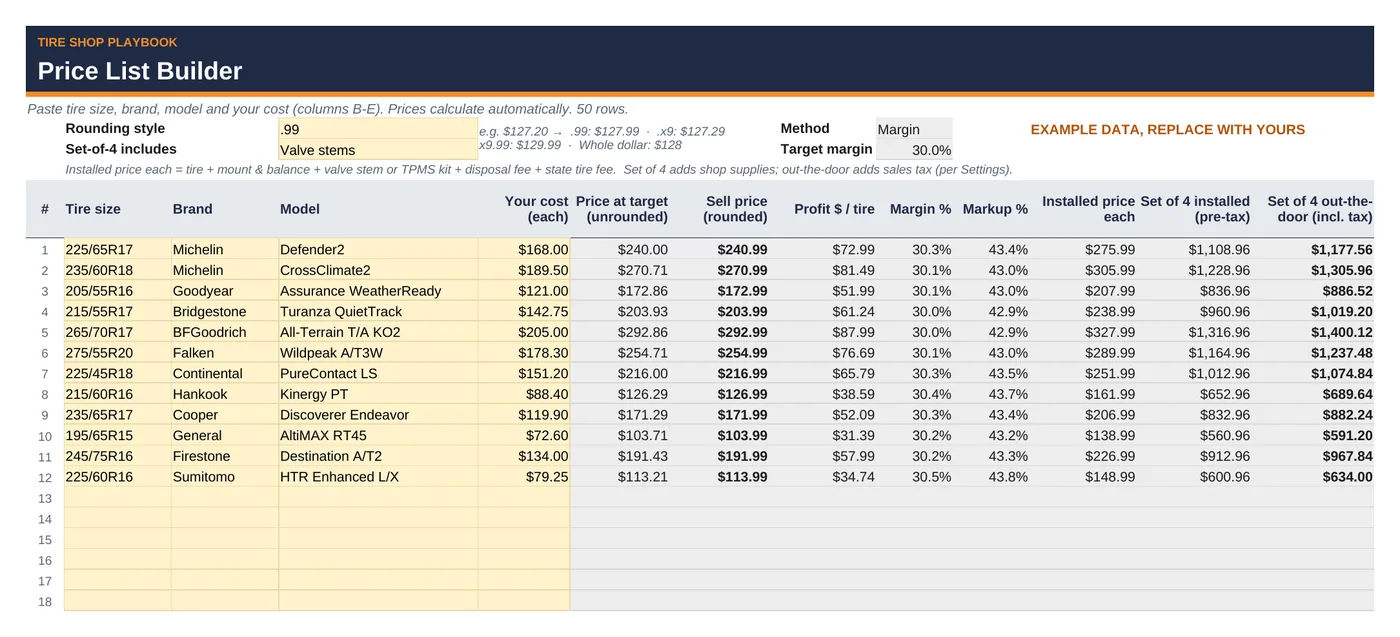
Out-the-door tire quotes in seconds, real profit $ and margin % on every job, a 50-size price list builder and a margin check.

  • Out-the-door quotes with profit $ and margin %
  • 50-size price list builder with rounding
  • Margin check flags low-margin tires green, yellow or red
Every file in this section
  • tire-pricing-margin-calculator.xlsx with 5 tabs:
    1. Start Here: a 5-minute how-to and a margin vs. markup primer
    2. Settings: your shop defaults: pricing method (margin or markup), target and minimum margin, mount & balance, TPMS kit, valve stems, alignment, disposal fee, state tire fee, shop supplies % and cap, sales tax, labor taxable (Yes/No), card fee, road hazard cost and price
    3. Quick Quote: a line-by-line out-the-door quote with profit
    4. Price List Builder: 50-row price list with rounding and set-of-4 installed pricing
    5. Margin Check: color-coded low-margin finder (40 rows)
  • Includes a step-by-step Quick Start Guide (PDF): tire-pricing-margin-calculator-quick-start-guide.pdf, 6 pages. Get set up in 5 minutes, then walk through each tab with a worked example and annotated screenshots.
  • Example data so you can see how it works. Replace it with your own numbers.
  • Works in Google Sheets and Excel. No macros, no add-ons, no subscription.

02 Inventory · 2 files · Google Sheets + Excel

Tire Inventory & DOT-Age Tracker

Know how old every tire on your rack is, sell the oldest first, and see how much money is sitting in aged stock.

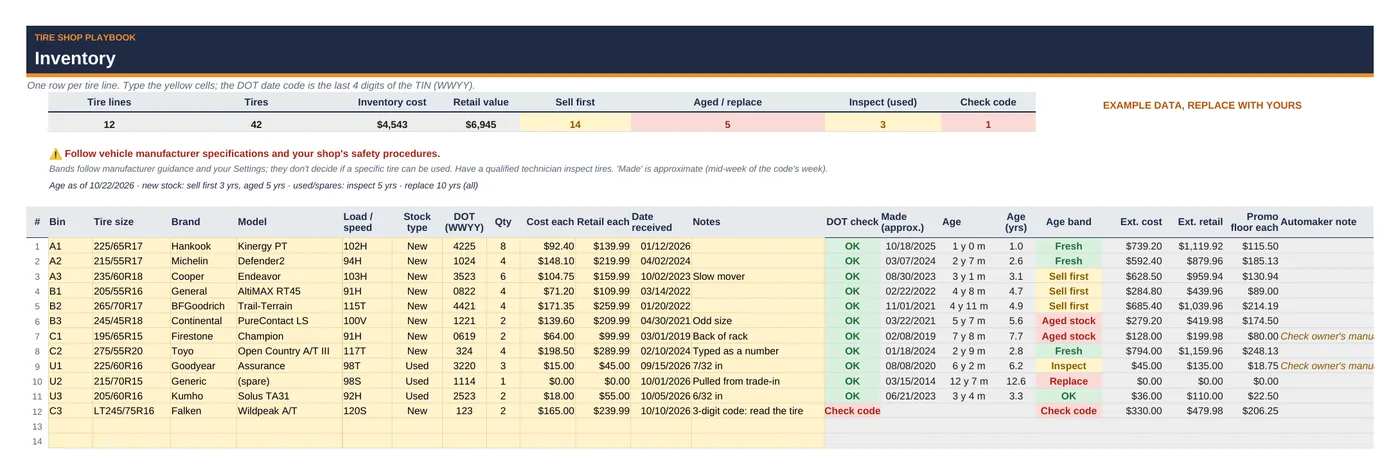
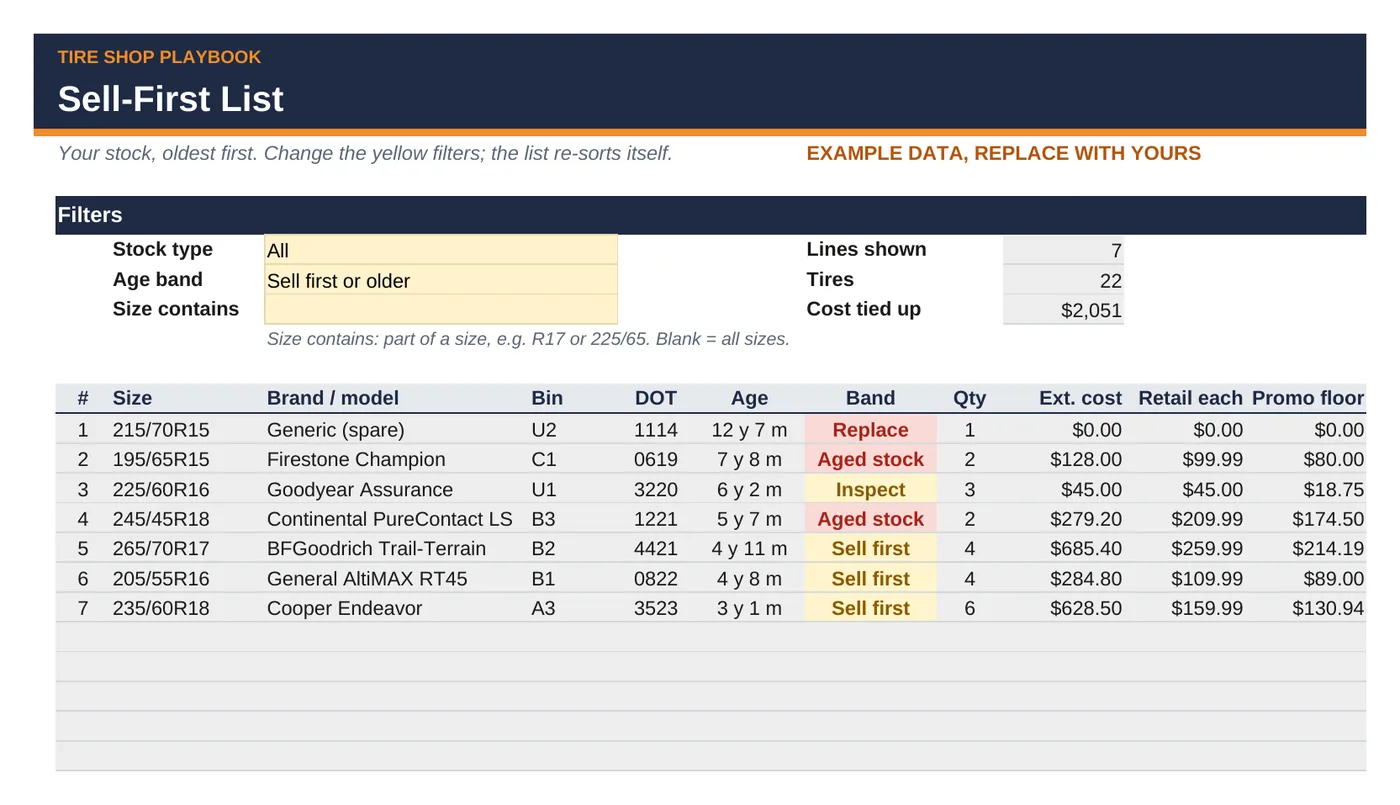
Reads the 4-digit DOT date code, bands every tire by age, builds a sell-first list and shows how much money sits in aged stock.

  • DOT code to manufacture date and age, automatically
  • Self-sorting Sell-First List, oldest on top
  • Tires and dollars by age band
Every file in this section
  • tire-inventory-dot-age-tracker.xlsx with 6 tabs:
    1. Start Here: a 10-minute how-to
    2. Settings: shop info; the Tire Pricing & Margin Calculator's pricing rows (same labels and order, so you can paste them over); tire-age thresholds (as-of date, inspect, replace, automaker note, unsold-stock warn and flag)
    3. Inventory: 150 tire lines with DOT age, band, extended cost and retail, promo floor and automaker note
    4. Sell-First List: your stock, oldest first, with filters
    5. Age Summary: tires and dollars by band and by year of age
    6. DOT Code Helper: check one code; how to read it; examples; sources
  • Includes a step-by-step Quick Start Guide (PDF): tire-inventory-dot-age-tracker-quick-start-guide.pdf, 6 pages, with annotated screenshots.
  • Example data so you can see how it works. Replace it with your own tires.
  • Works in Google Sheets and Excel. No macros, no add-ons, no subscription.
03 Customer-supplied tires · 6 files · Word + PDF + Google Sheets/Excel

Customer-Supplied & Online Tire Install Procedure

Say yes to the right customer-supplied and online-order tires, say no to the wrong ones, and get paid for the bay time.

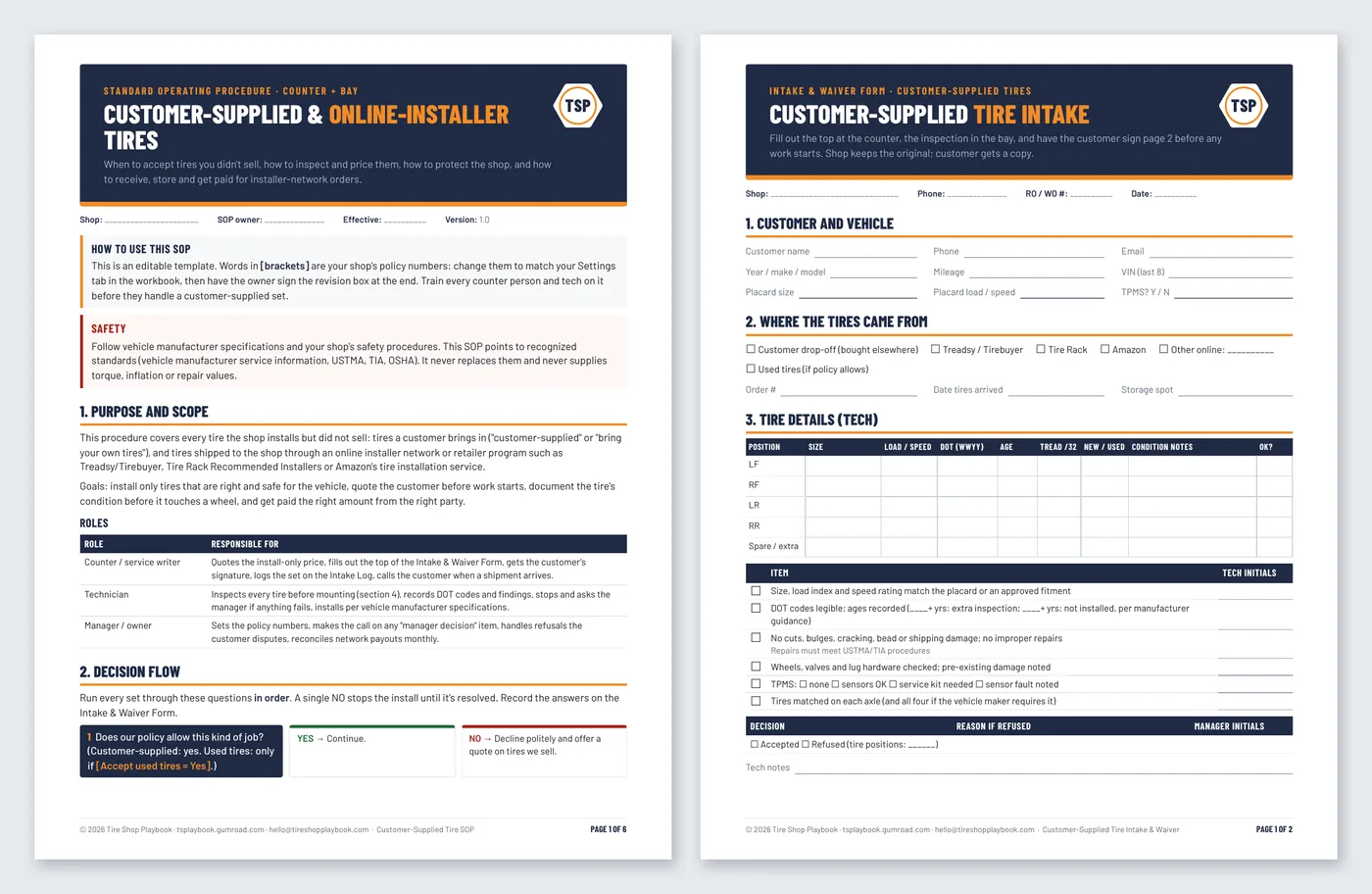
An SOP, an intake & waiver form, and a workbook to price install-only work, check installer-network payouts and log every set.

  • 7-question accept / decline decision flow
  • 2-page intake & waiver form (editable)
  • Install rate card and network payout check
Please note: The waiver form is a plain-English template, not legal advice. Have your attorney review it before you use it.
Every file in this section
  • customer-supplied-tire-sop.pdf + .docx: 6-page standard operating procedure (editable)
  • customer-supplied-tire-intake-waiver-form.pdf + .docx: 2-page intake & waiver form (editable)
  • customer-supplied-tire-procedure-workbook.xlsx with 5 tabs:
    1. Start Here: a 10-minute how-to
    2. Settings: shop info; the Tire Pricing & Margin Calculator's pricing rows (same labels and order, so you can paste them over); your customer-supplied policy (add-on, bay minutes, profit per bay hour, inspection fee, tire-age defaults, used tires, storage, follow-up days)
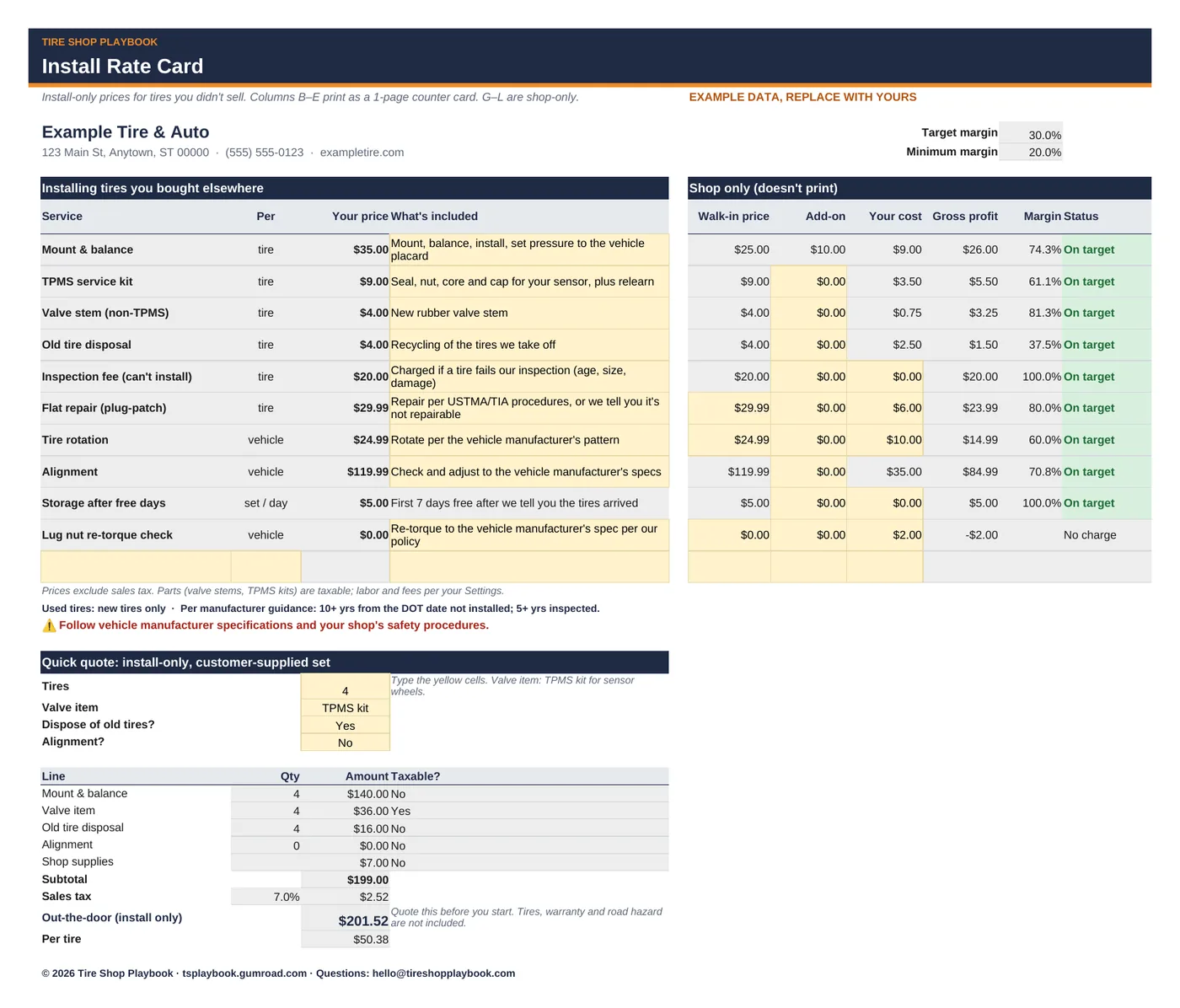
    3. Install Rate Card: printable counter card + shop-only margin columns + quick quote
    4. Network Pricing Check: walk-in vs. customer-supplied vs. network payout, with break-even payout
    5. Intake Log: 100 rows with DOT age, decision, storage fee, follow-up and payout status
  • Includes a step-by-step Quick Start Guide (PDF): customer-supplied-tire-procedure-quick-start-guide.pdf, 6 pages, with a worked example and annotated screenshots.
  • Example data so you can see how it works. Replace it with your own numbers.
  • Works in Google Sheets and Excel, Word and Google Docs. No macros, no add-ons, no subscription.
04 Estimates & invoices · 2 files · Google Sheets + Excel

Tire Estimate, Work Order & Invoice Kit

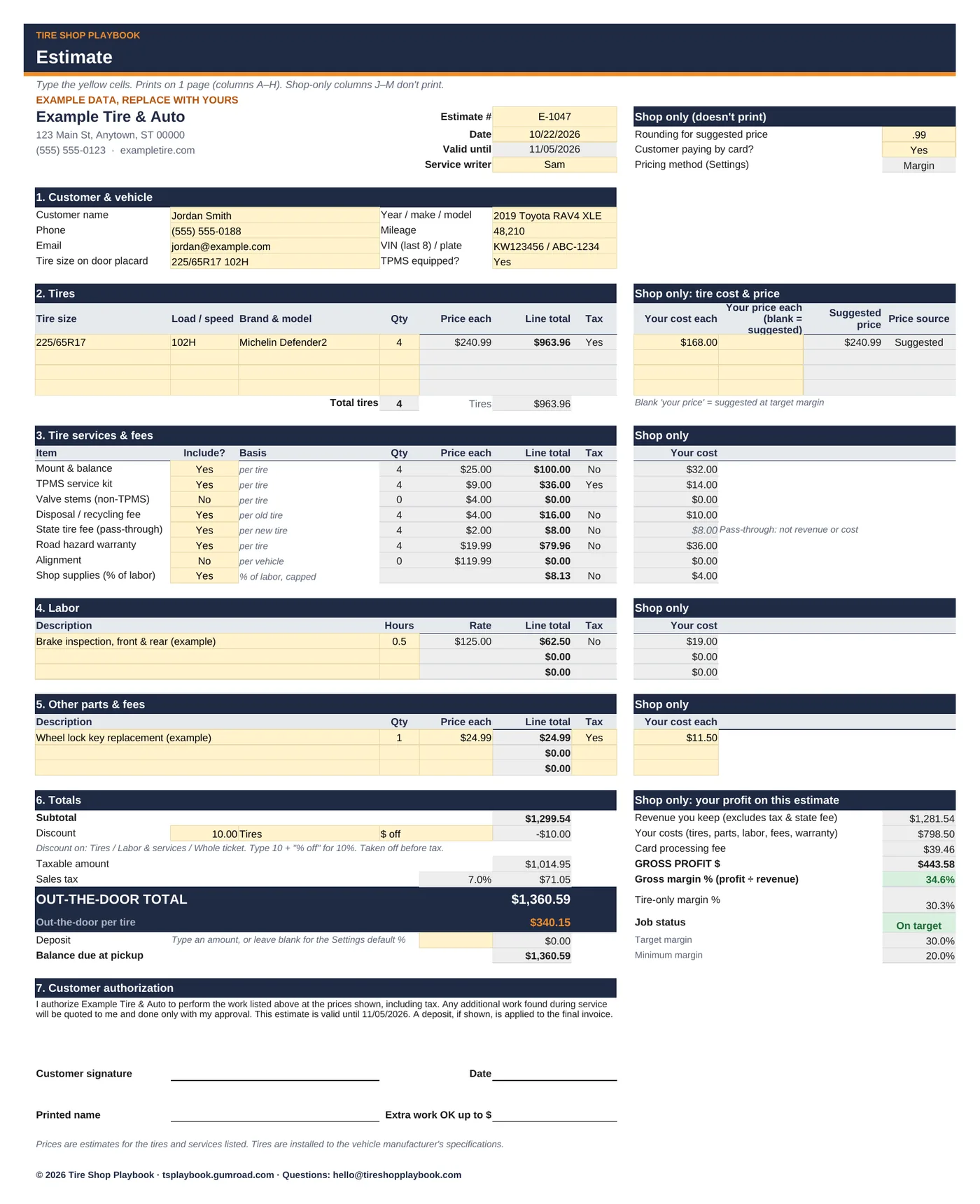
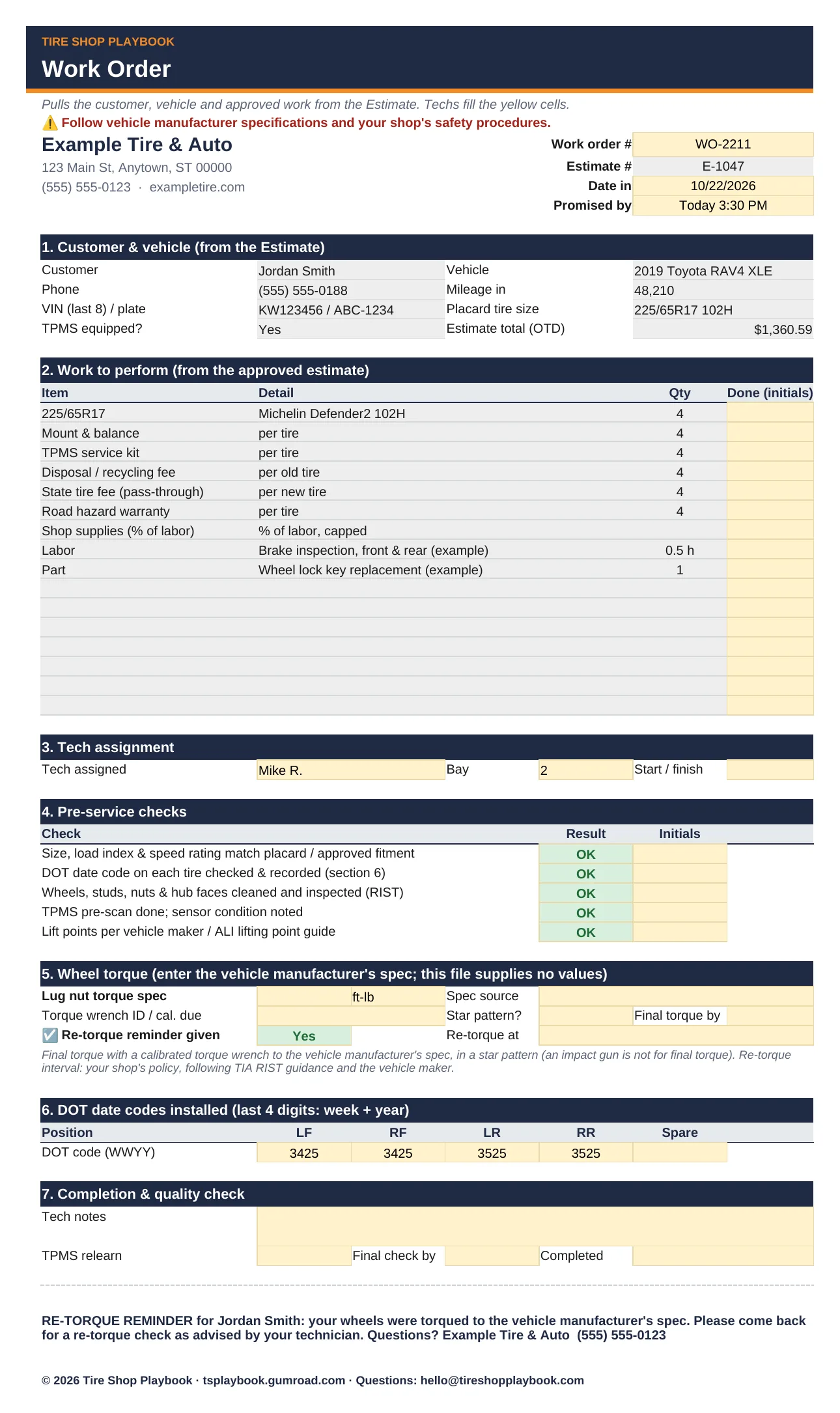
A clean, signed 1-page tire estimate with the out-the-door price, a work order for the bay with torque and re-torque fields, and a 1-page invoice at pickup.

A signed 1-page estimate with the out-the-door price, a work order for the bay, a 1-page invoice at pickup and an estimate log.

  • 1-page estimate with OTD total and price per tire
  • Work order with a torque spec field you fill from the vehicle maker
  • Invoice with payment and balance due
Every file in this section
  • tire-estimate-work-order-invoice-kit.xlsx with 6 tabs:
    1. Start Here: a 10-minute how-to
    2. Settings: shop name and address; the calculator's pricing rows (same labels and order, so you can paste them over); labor rate and cost; taxable toggles; default deposit; estimate valid days; up to 6 tech names; invoice and warranty notes
    3. Estimate: the 1-page customer estimate with shop-only profit columns
    4. Work Order: bay copy with checks, torque spec field and re-torque reminder
    5. Invoice: 1-page customer invoice with payment, balance due, DOT codes and re-torque note
    6. Estimate Log: 100 rows with status colors, follow-up flags and close rate
  • Includes a step-by-step Quick Start Guide (PDF): tire-estimate-work-order-invoice-kit-quick-start-guide.pdf, 6 pages, with a worked example and annotated screenshots.
  • Example data so you can see how it works. Replace it with your own numbers.
  • Works in Google Sheets and Excel. No macros, no add-ons, no subscription.
05 Marketing · 10 files · Google Sheets/Excel + Word + PDF

Seasonal Marketing Kit

Know what to run every month, what to say, and whether it paid for itself.

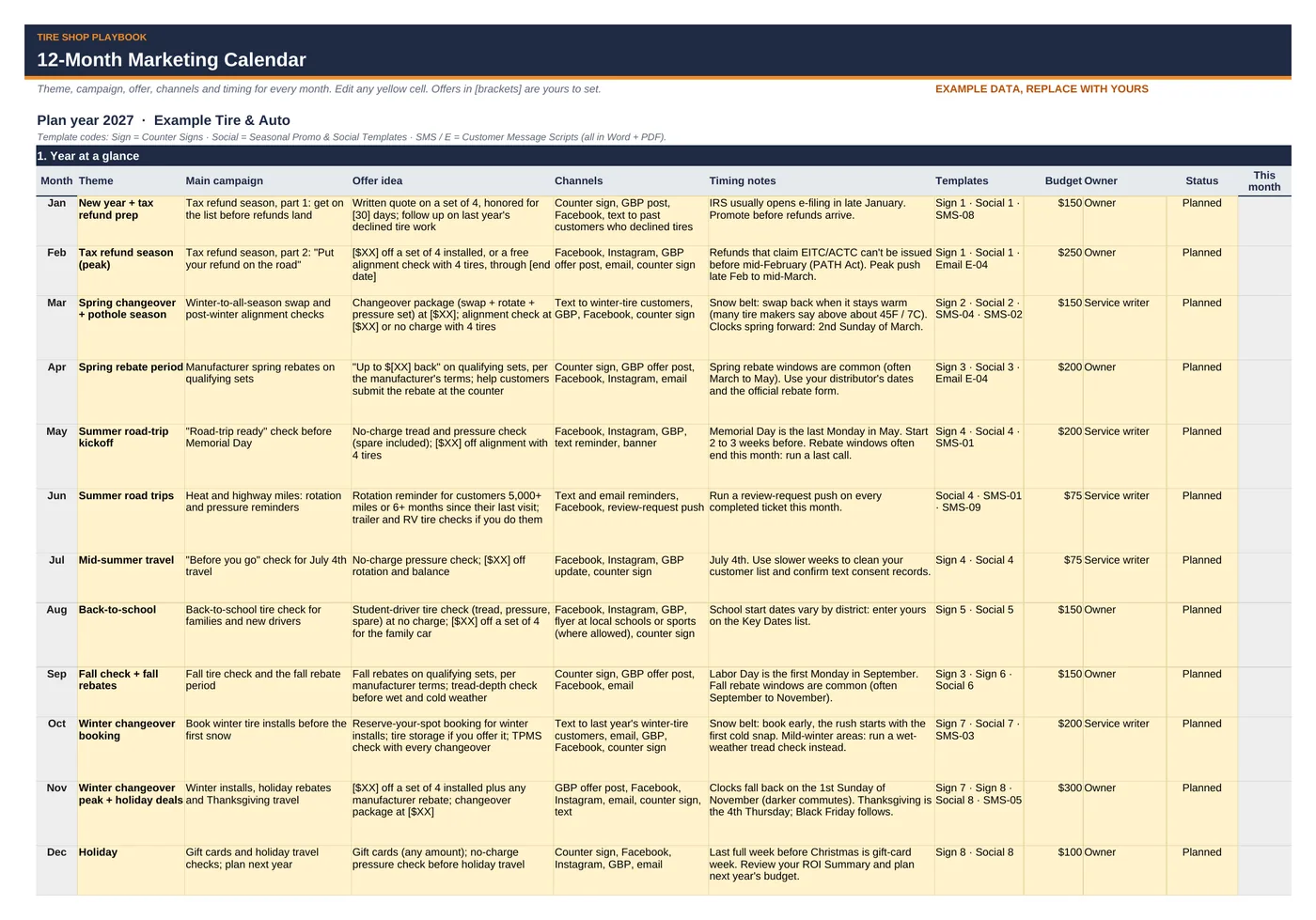
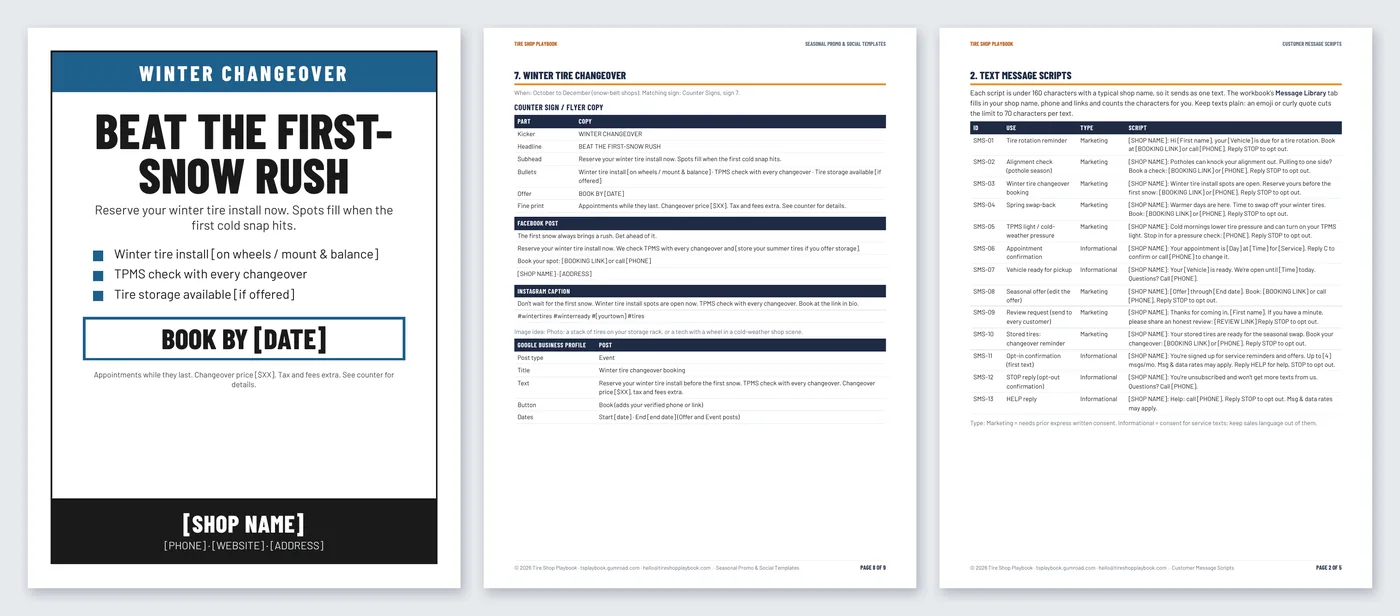
A 12-month marketing calendar, counter signs, social posts, 13 text scripts, review-request scripts and a promo ROI tracker.

  • 12-month calendar built around the tire year
  • 8 counter signs plus social posts for 8 seasons
  • Promo tracker with ROI on gross profit
Please note: The texting, email and review notes are a plain-English summary, not legal advice.
Every file in this section
  • seasonal-marketing-kit-workbook.xlsx with 8 tabs:
    1. Start Here: a 10-minute how-to
    2. Settings: shop name, address, phone, website, booking link, Google review link, opt-out line, texts per month, plan year, typical gross margin, ROI targets, minimum margin on a discounted job
    3. Marketing Calendar: 12-month plan with budget, owner and status dropdown
    4. Key Dates: 17 events with calculated or your own dates, lead days, start-promoting date and status
    5. Message Library: 13 ready texts filled in from Settings, plus 6 rows for your own, with character, text-count and compliance checks
    6. Offer Check: compare up to 5 offers
    7. Promo Tracker: 50 campaign rows with channel and month dropdowns
    8. ROI Summary: totals by channel (12 channels) and by month vs. budget, best and lowest ROI campaign
  • counter-signs.pdf + .docx: 8 printable letter-size counter signs, one per season, with your shop name and phone at the bottom (editable)
  • seasonal-promo-and-social-templates.pdf + .docx: 9 pages. Sign copy, Facebook, Instagram and Google Business Profile posts for 8 seasons (editable)
  • customer-message-scripts.pdf + .docx: 5 pages. Text and email scripts, review requests and replies, consent wording for your work order, and plain-English texting (TCPA), email (CAN-SPAM) and review-rule notes (editable)
  • 12-month-marketing-calendar.pdf + .docx: 3-page printable calendar, key-dates list and a monthly marketing checklist (editable)
  • Includes a step-by-step Quick Start Guide (PDF): seasonal-marketing-kit-quick-start-guide.pdf, 6 pages, with a worked example and annotated screenshots.
  • Example data so you can see how it works. Replace it with your own numbers.
  • Works in Google Sheets and Excel, Word and Google Docs. No macros, no add-ons, no subscription.
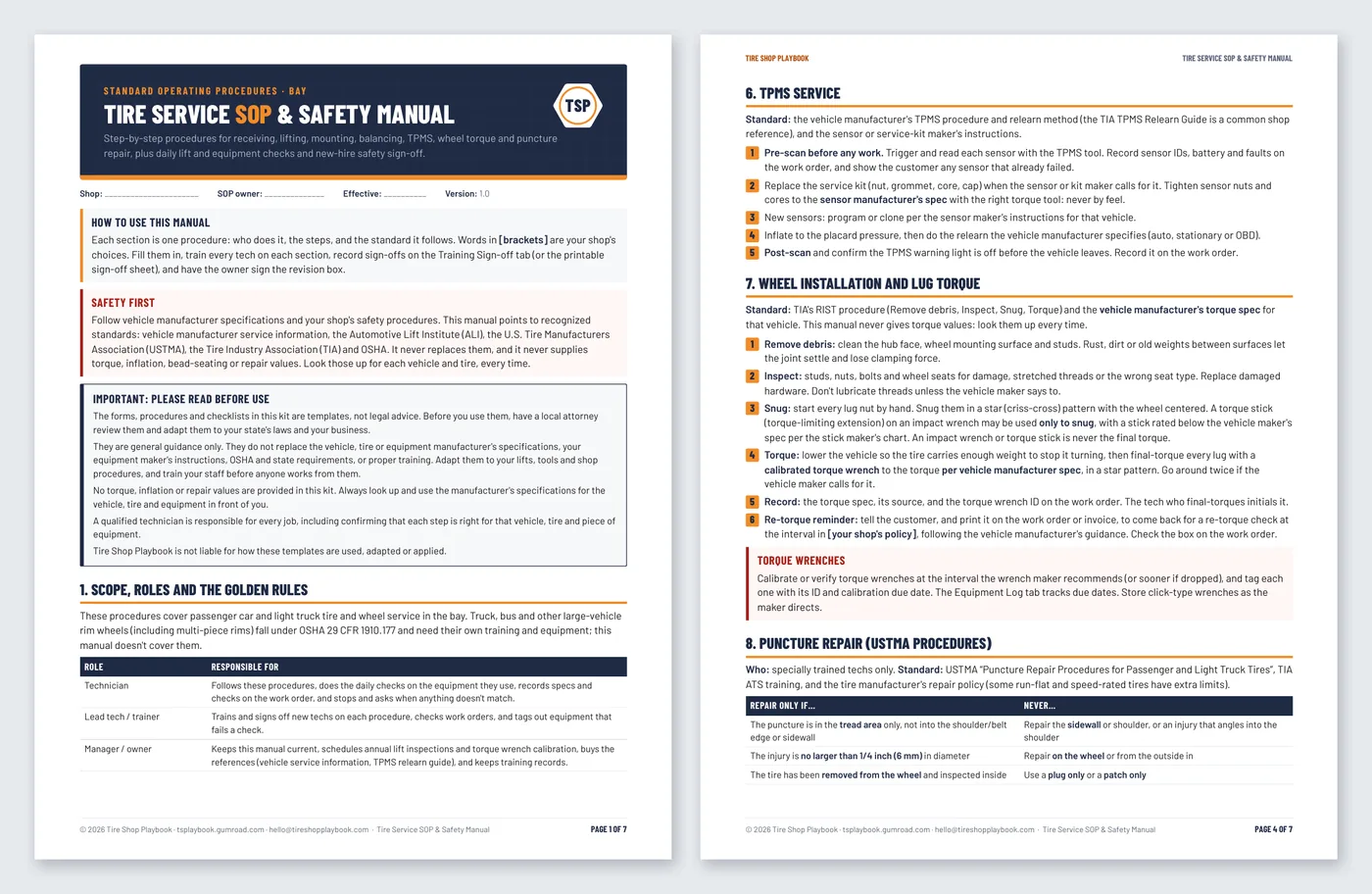
06 SOP & safety · 7 files · Word + PDF + Excel

Tire Service SOP & Safety Checklists

Write down how your bay does the work, check every lift every shift, and know who's cleared to work alone.

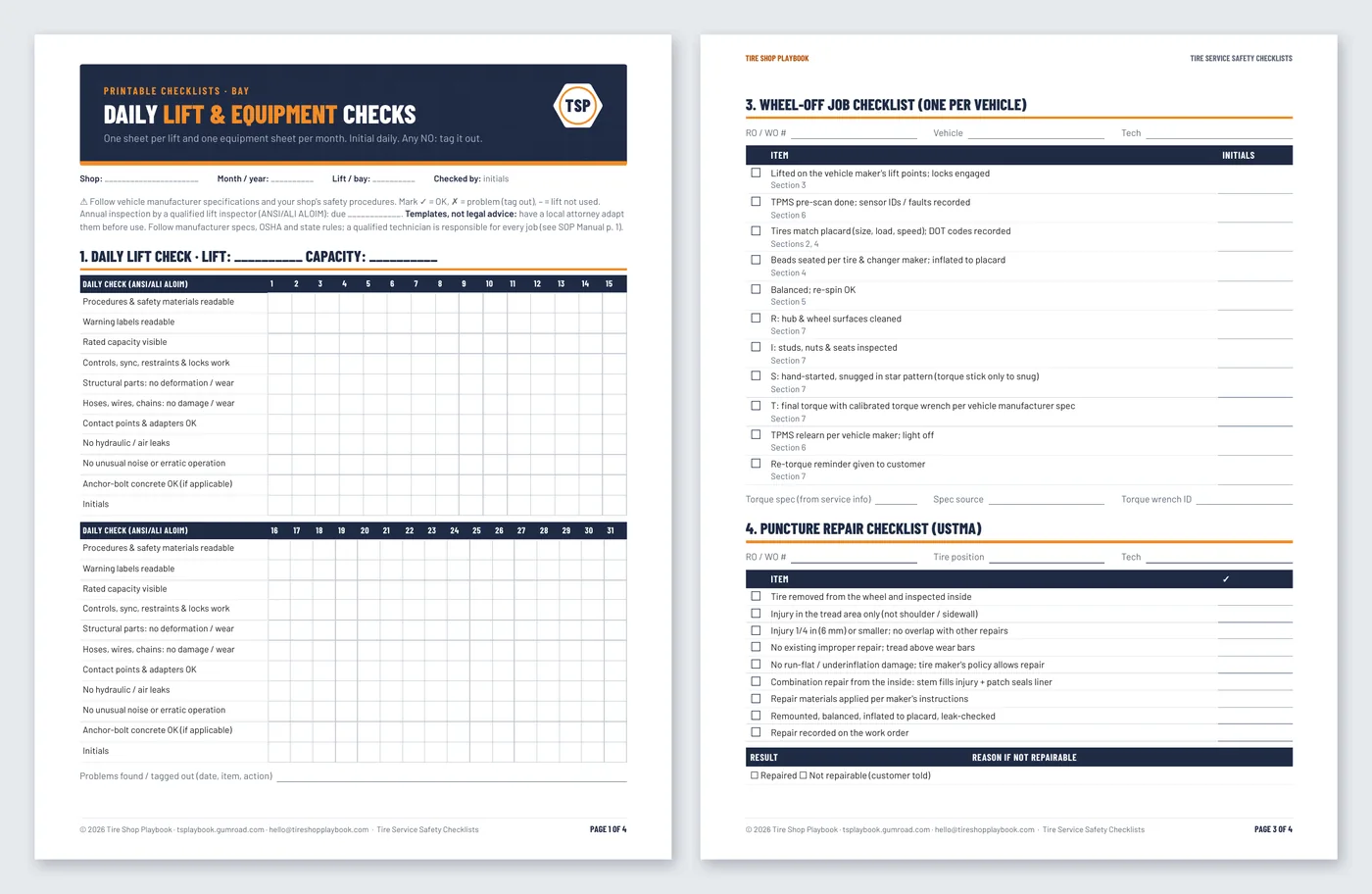
A tire-bay SOP manual, printable lift and equipment checklists, and a Safety Log for daily checks, due dates and new-hire sign-offs.

  • 13-section SOP & Safety Manual (editable Word)
  • Daily lift & equipment checklists
  • Safety Log: due dates and training sign-off
Please note: Templates, not legal advice. Have a local attorney adapt them for your shop and state. Not OSHA compliance or certification, and no torque or inflation numbers: every procedure points to the vehicle manufacturer's spec.
Important: please read before use. The forms, procedures and checklists in this kit are templates, not legal advice. Have a local attorney adapt them to your state's laws and your business before use. They are general guidance and don't replace the vehicle, tire or equipment manufacturer's specifications and instructions, OSHA and state requirements, or proper training. No torque, inflation or repair values are provided: always use the manufacturer's specs. A qualified technician is responsible for every job, and Tire Shop Playbook is not liable for how the templates are used.
Every file in this section
  • SOP & Safety Manual: tire-service-sop-safety-manual.docx (edit it) and tire-service-sop-safety-manual.pdf (7 pages). [Brackets] mark your shop's choices, and there's an optional "Reviewed and adopted by" sign-off line for your shop's qualified reviewer.
  • Safety Checklists: tire-service-safety-checklists.docx and .pdf (4 pages): monthly lift check, daily equipment check, wheel-off job checklist, puncture repair checklist, new-hire safety sign-off.
  • Safety Log: tire-service-safety-log.xlsx with 6 tabs:
    1. Start Here: a short how-to
    2. Settings: shop info, lift names (up to 8), due-soon warning, lift inspection and torque wrench calibration intervals
    3. Daily Checks: OK / NO / N/A for each lift and machine, every day of the month
    4. Equipment Log: last inspected/calibrated, next due, days left and status
    5. Training Sign-off: levels 0–3 per employee, ★ skills count and "cleared for solo ★ work"
    6. Issue Log: failed checks, tag-outs, repairs and back-in-service dates
  • Includes a step-by-step Quick Start Guide (PDF): tire-service-sop-safety-checklists-quick-start-guide.pdf, 6 pages, with annotated screenshots.
  • Example data in the Safety Log so you can see how it works. Replace it with your own.
  • The Safety Log works in Google Sheets and Excel. No macros, no add-ons, no subscription.
07 Hiring & training · 45 files · Excel + Word + PDF

Tech Hiring & Training Kit

Hire carefully, train on purpose, and know who on your crew is signed off on what.

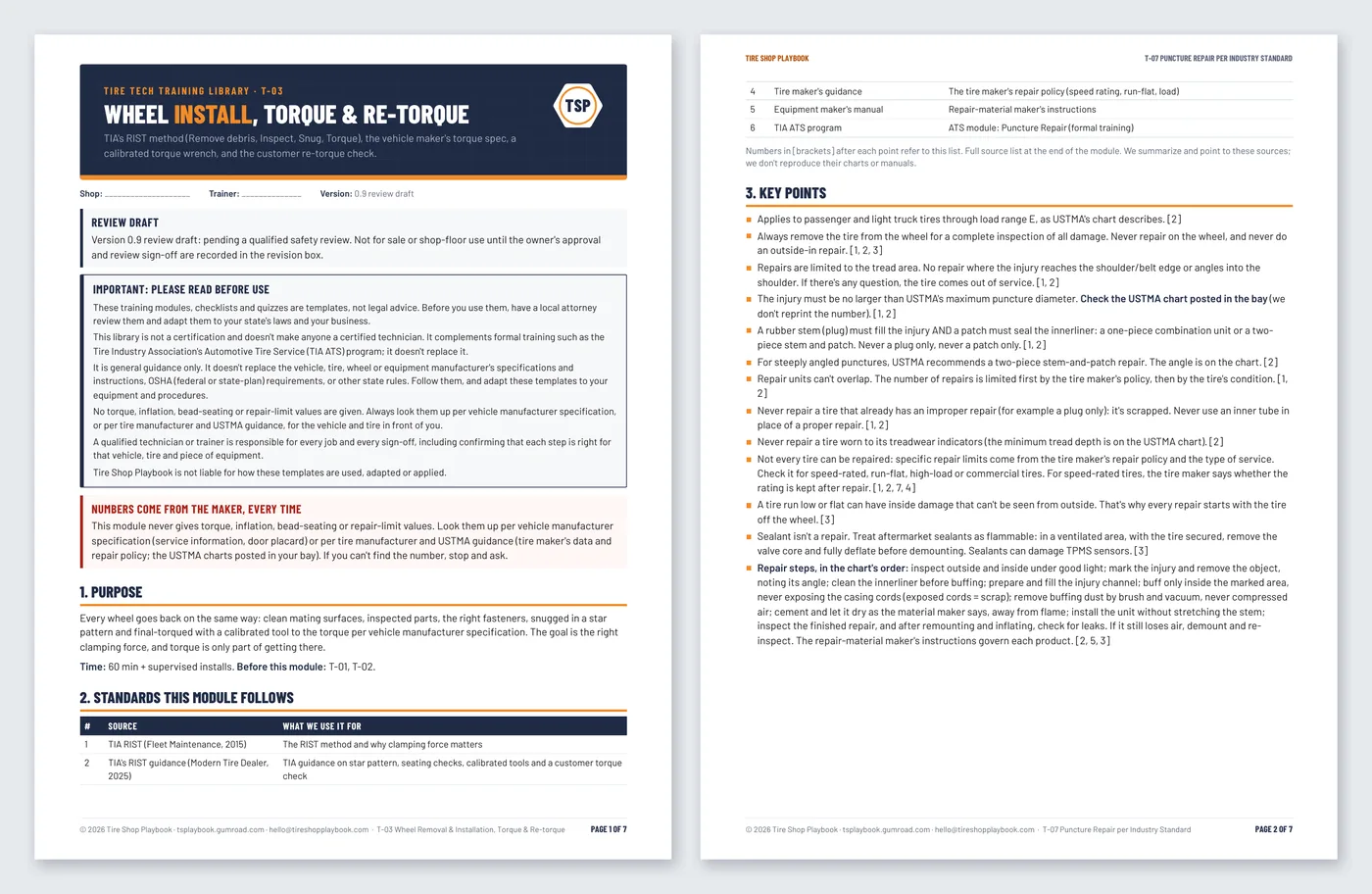
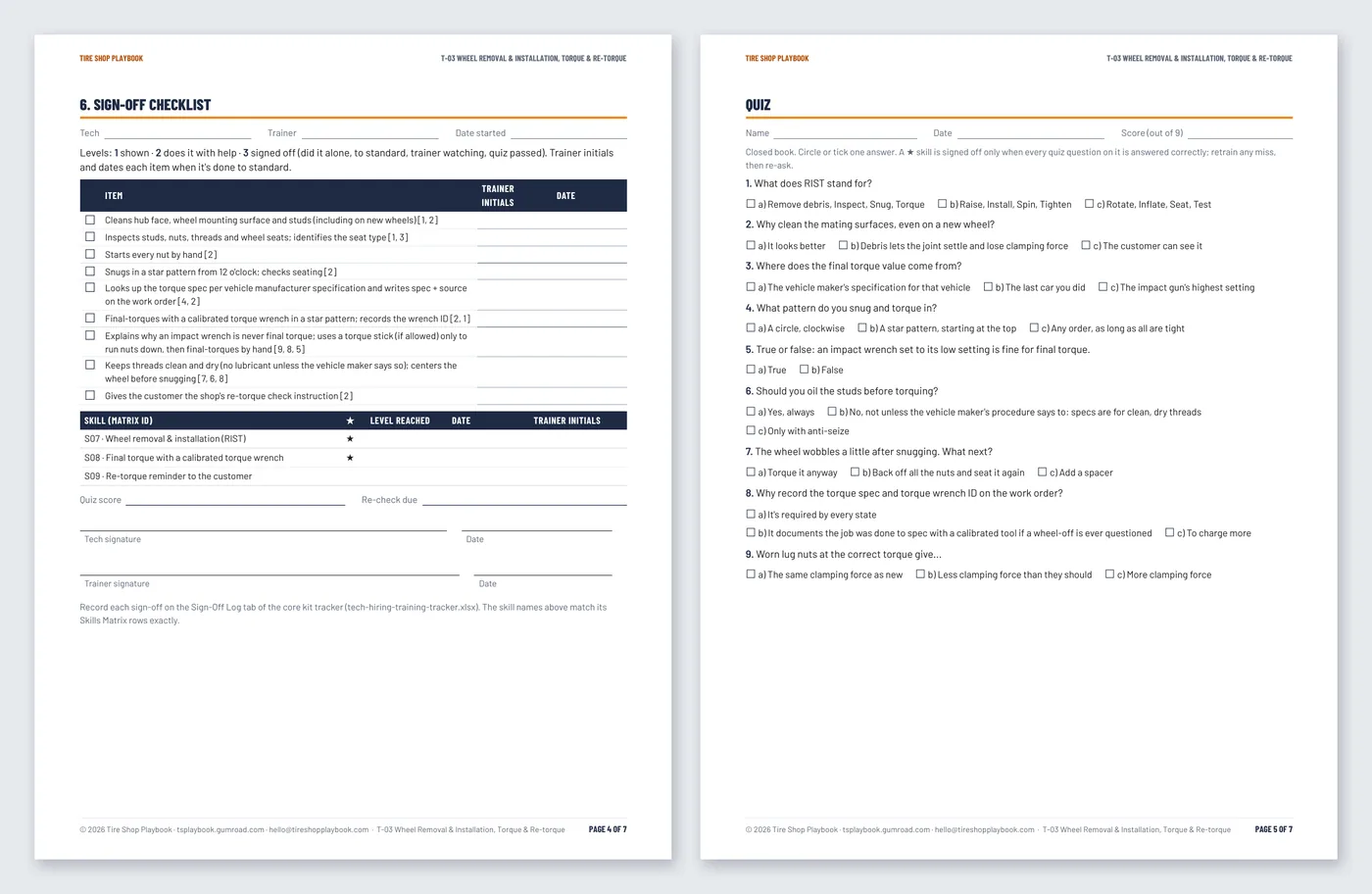
Everything in the Tech Hiring Kit, plus a trainer guide and 10 training modules for the bay, each with a sign-off checklist, a quiz and an answer key.

  • Everything in the Tech Hiring Kit
  • Trainer guide + 10 training modules (Word + PDF)
  • Sign-off checklists, quizzes and sign-off cards that match the Skills Matrix
Please note: The training library is an internal, source-checked training aid (checked against 2026 OSHA, TIA, USTMA and ALI sources). It is not a certification and not a TIA-certified review; for certification, use TIA's ATS program. Templates, not legal advice. No torque, inflation or repair values: follow the vehicle and tire manufacturer's specs.

Section 07 holds two kits in one folder: Tech-Hiring-Kit/ (the full Tech Hiring Kit: tracker + 8 hiring documents) and Tech-Training-Library/ (trainer guide, modules T-01 to T-10, sign-off cards).

Every file in this section
  • Everything in the Tech Hiring Kit:
    • tech-hiring-training-tracker.xlsx (11 tabs);
    • 8 hiring documents (Word + PDF);
    • the hiring Quick Start Guide.
  • Training library:
    • trainer guide and modules T-01 to T-10, each as editable Word (.docx) and PDF;
    • training sign-off cards (Word + PDF).
  • Quick Start Guides: tech-training-library-quick-start-guide.pdf (6 pages), plus the core kit's guide.
  • DISCLAIMER.txt: please read before use.
  • Works in Google Sheets and Excel, Word and any PDF reader. No macros, no add-ons, no subscription.
Start Here

A 30-day rollout, not a binder on a shelf

The Start Here guide shows how the sections fit together and gives you an order to roll them out: about an hour a day, money and safety first.

  • Week 1

    Price right, check the lifts

    Fill in the Calculator's Settings, build your price list and fix the red rows on the Margin Check. Start the daily lift & equipment checklist. Write your next job on the new estimate.

    Sections 01 · 06 · 04

  • Week 2

    The rack and your policies

    Date every tire on the rack and work the sell-first list. Set your customer-supplied tire policy and install rate card; send the waiver to your attorney.

    Sections 02 · 03

  • Week 3

    The bay and the crew

    Adapt the SOP manual to your equipment and have it reviewed. Enter your crew in the Skills Matrix and run T-01 shop safety with everyone.

    Sections 06 · 07

  • Week 4

    Grow, and hire when you need to

    Plan the next 90 days of marketing, print the counter signs and log your first promo. Hiring? Build a pay range and post the ad. Day 30: review the numbers.

    Sections 05 · 07

The Tire Shop Playbook cover: the complete system for independent tire shops

One product · 7 sections · 74 files

The Tire Shop Playbook

The complete system for independent tire shops: every tool, SOP, checklist and hiring & training kit, in one download.

$199$231 Worth $231 if bought separatelyOne-time · Instant download · No subscription

How the math works: Bought one at a time at their former prices, the kits inside come to $231: the 5 shop tools ($29 + $24 + $19 + $12 + $29 = $113), the SOP & Safety Checklists ($39) and the Tech Hiring & Training Kit ($79).* The Playbook is $199.
*The $79 Tech Hiring & Training Kit already contains the full $39 Tech Hiring Kit, so the Hiring Kit isn't counted twice.

How the math works

Inside the PlaybookFormer price on its own
01 · Tire Pricing & Margin Calculator$29
02 · Tire Inventory & DOT-Age Tracker$24
03 · Customer-Supplied & Online Tire Install Procedure$19
04 · Tire Estimate, Work Order & Invoice Kit$12
05 · Seasonal Marketing Kit$29
06 · Tire Service SOP & Safety Checklists$39
07 · Tech Hiring & Training Kit$79
Worth if bought separately*$231
The Tire Shop Playbook$199

*The $79 Tech Hiring & Training Kit already contains the full $39 Tech Hiring Kit, so the Hiring Kit isn't counted twice.

Questions

Important: please read before use

The forms, procedures and checklists in this kit are templates, not legal advice. Have a local attorney adapt them to your state's laws and your business before use. They are general guidance and don't replace the vehicle, tire or equipment manufacturer's specifications and instructions, OSHA and state requirements, or proper training. No torque, inflation or repair values are provided: always use the manufacturer's specs. A qualified technician is responsible for every job, and Tire Shop Playbook is not liable for how the templates are used.

The training library is an internal, source-checked training aid (checked against 2026 OSHA, TIA, USTMA and ALI sources). It is not a certification and not a TIA-certified review; for technician certification, use TIA's ATS program. Hiring law varies by state: check with your state labor department or an employment attorney.

I already bought one of the kits on its own

You keep it. It stays in your Gumroad library and your receipt link still works. Questions? Email hello@tireshopplaybook.com.

Why are there no torque or pressure numbers?

They differ by vehicle, wheel and tire, and they change. Every procedure tells your tech where to look them up: the vehicle maker's service information and tire placard, the tire maker's guidance, and the USTMA repair chart.

Does it work in Google Sheets and Excel?

Yes. Upload any .xlsx to Google Drive and open it with Google Sheets, or open it in Excel. The Word files also open in Google Docs. No macros, no add-ons.

Do I get updates?

When a file is fixed or improved, the new version goes on the same Gumroad product. Open your receipt or Gumroad library to download the current files.

Refunds?

All sales are final. If a file doesn't work, email hello@tireshopplaybook.com and we'll make it right.