Marketing · Google Sheets/Excel + Word + PDF
Seasonal Marketing Kit
Know what to run every month, what to say, and whether it paid for itself.
What it does
Most tire shops market in bursts: a sign when it's slow, a post when someone remembers, a discount nobody tracked. Then winter changeover sneaks up, the rebate window closes, and there's no way to tell which of last year's promos made money.
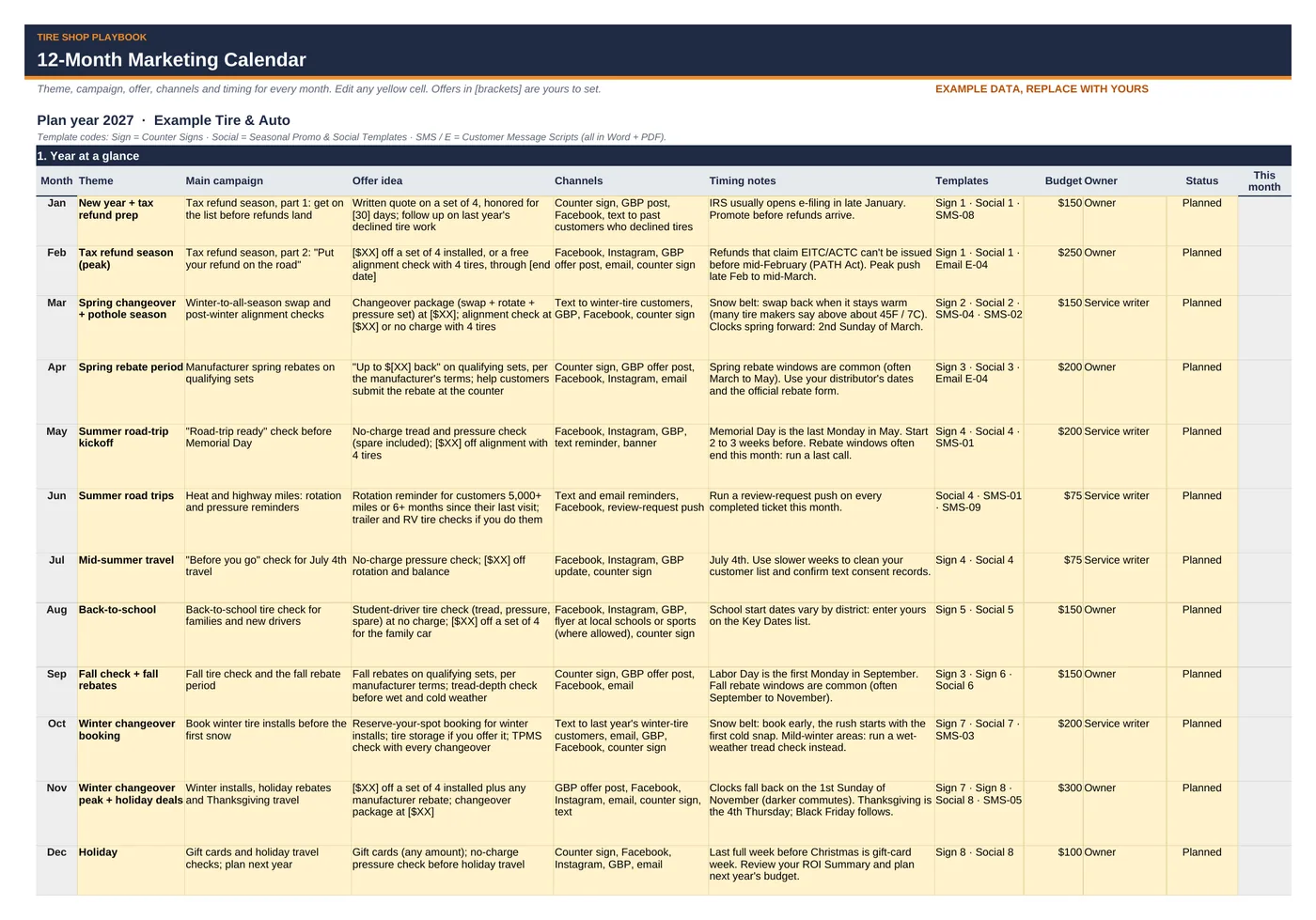
This kit gives you the plan, the words and the numbers. A 12-month marketing calendar built around the tire year: tax refund season, spring changeover and pothole season, spring and fall rebate periods, summer road trips, back-to-school, the fall tire check, winter changeover and the holidays. Ready-to-edit counter signs, social posts, text and email scripts for each season. And a promo tracker that shows ROI on gross profit, not revenue, so you know what a campaign really earned.
It's built for shop owners and service writers, not marketers. Type your shop name, phone and links once and they fill in every text message. Yellow cells are where you type; grey cells calculate.
What it helps you do:
- Plan the whole year in one sitting: theme, campaign, offer idea, channels, timing notes, matching templates, budget and owner for all 12 months. Every cell is editable.
- Start every push on time: a Key Dates planner calculates Memorial Day, Labor Day, Thanksgiving, Black Friday, daylight saving and Tax Day for your plan year, adds your own dates (rebate windows, first day of school, first cold snap), and shows the date to start promoting.
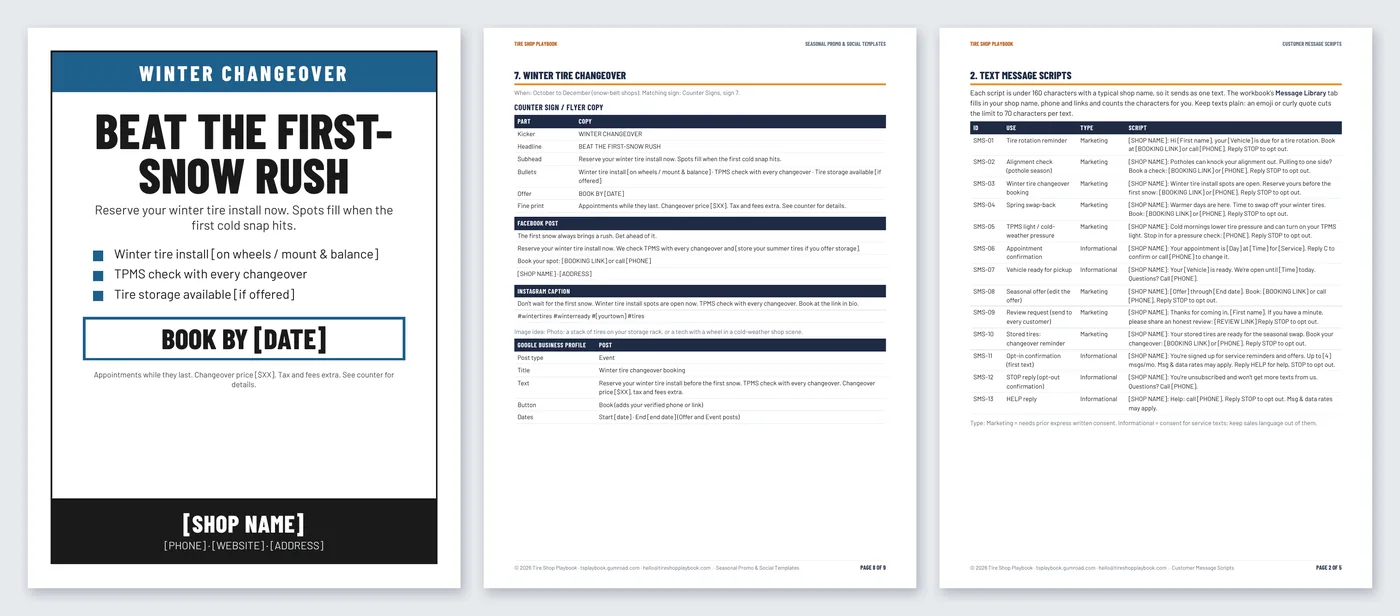
- Post without starting from scratch: counter sign / flyer copy plus Facebook, Instagram and Google Business Profile posts for 8 seasons. GBP posts are written to Google's rules (no phone numbers or links in the text; use the button).
- Text customers the right way: 13 text scripts (rotation, alignment check, winter changeover, spring swap-back, TPMS / cold-weather pressure, stored tires, seasonal offer, appointment and pickup, review request, opt-in, STOP and HELP replies). The workbook fills in your shop details, counts characters and flags any marketing text missing your shop name or a STOP line.
- Ask for reviews without breaking the rules: counter, text, email and receipt scripts, plus reply templates for positive, mixed and negative reviews.
- Check a discount before you print it: profit per job with the offer, margin left, and how many jobs it takes to pay back the campaign.
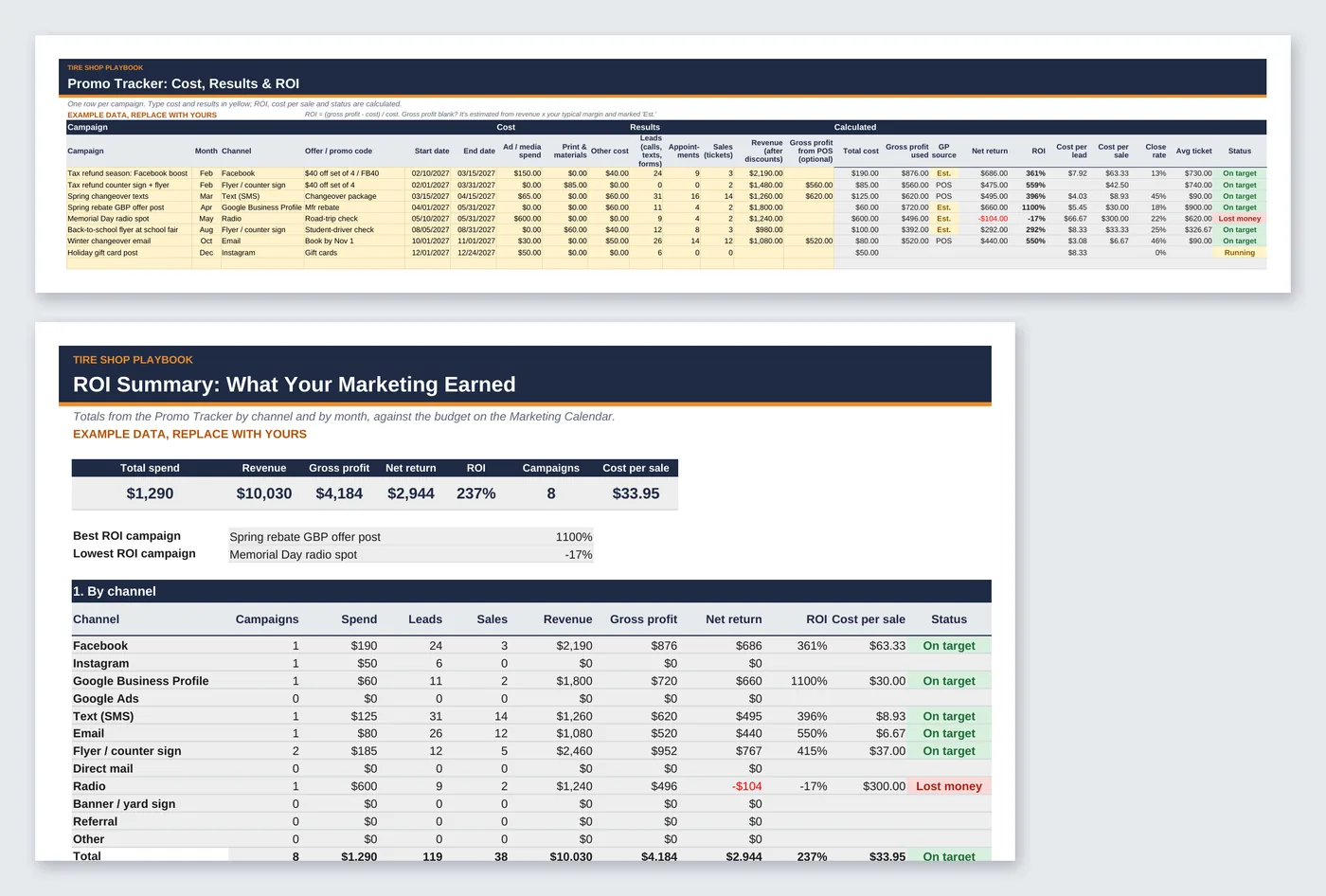
- See what each campaign earned: cost, leads, sales, revenue and gross profit per campaign, with ROI, cost per lead, cost per sale and a status word. Totals by channel and by month against your planned budget.
What's included
seasonal-marketing-kit-workbook.xlsxwith 8 tabs:- Start Here: a 10-minute how-to
- Settings: shop name, address, phone, website, booking link, Google review link, opt-out line, texts per month, plan year, typical gross margin, ROI targets, minimum margin on a discounted job
- Marketing Calendar: 12-month plan with budget, owner and status dropdown
- Key Dates: 17 events with calculated or your own dates, lead days, start-promoting date and status
- Message Library: 13 ready texts filled in from Settings, plus 6 rows for your own, with character, text-count and compliance checks
- Offer Check: compare up to 5 offers
- Promo Tracker: 50 campaign rows with channel and month dropdowns
- ROI Summary: totals by channel (12 channels) and by month vs. budget, best and lowest ROI campaign
counter-signs.pdf+.docx: 8 printable letter-size counter signs, one per season, with your shop name and phone at the bottom (editable)seasonal-promo-and-social-templates.pdf+.docx: 9 pages. Sign copy, Facebook, Instagram and Google Business Profile posts for 8 seasons (editable)customer-message-scripts.pdf+.docx: 5 pages. Text and email scripts, review requests and replies, consent wording for your work order, and plain-English texting (TCPA), email (CAN-SPAM) and review-rule notes (editable)12-month-marketing-calendar.pdf+.docx: 3-page printable calendar, key-dates list and a monthly marketing checklist (editable)- Includes a step-by-step Quick Start Guide (PDF):
seasonal-marketing-kit-quick-start-guide.pdf, 6 pages, with a worked example and annotated screenshots. - Example data so you can see how it works. Replace it with your own numbers.
- Works in Google Sheets and Excel, Word and Google Docs. No macros, no add-ons, no subscription.
Questions
Does it work in Google Sheets and Excel?
Yes. Upload the .xlsx to Google Drive and open it with Google Sheets, or open it in Excel (desktop or web). Formula cells are locked in Excel (no password) and color-coded grey in Sheets, so type only in the yellow cells. The Word files open in Word and Google Docs.
Is this legal advice?
No. The texting, email and review notes are a plain-English summary of the federal basics (TCPA consent and opt-outs, CAN-SPAM, Google and FTC review rules) as of October 2026. State laws can be stricter, and the rules change. Check with your attorney and your texting provider before you send.
Does it send texts or emails for me?
No. It's a planning and template kit. Copy the messages into the texting or email tool you already use.
Are the offers and results real?
No. Offers are placeholders ([$XX]) and every budget, date and campaign result is example data. Results vary; replace them with your own.
Does it use tire-brand names or logos?
No. The templates use none. For a manufacturer rebate, use only the wording and art your rebate or co-op program allows.
I'm in a mild-winter area. Is it still useful?
Yes. Skip the winter changeover set and run the fall tire check and summer road-trip campaigns instead. Every month on the calendar is editable.
Can I change the templates?
Yes. It's your copy. Every Word file is editable, and every [bracketed] field is there for you to replace.
Refunds?
All sales are final. If a file doesn't work, email hello@tireshopplaybook.com and we'll make it right.
A look inside
Screenshots with example data. Replace it with your own numbers.